3D printer cooling fan quick answer
Choose a 3D printer fan by size, thickness, voltage, connector, wire count, airflow type, and mounting location. Do not replace a 24 V fan with a 12 V fan or assume every 4010 fan has the same connector.
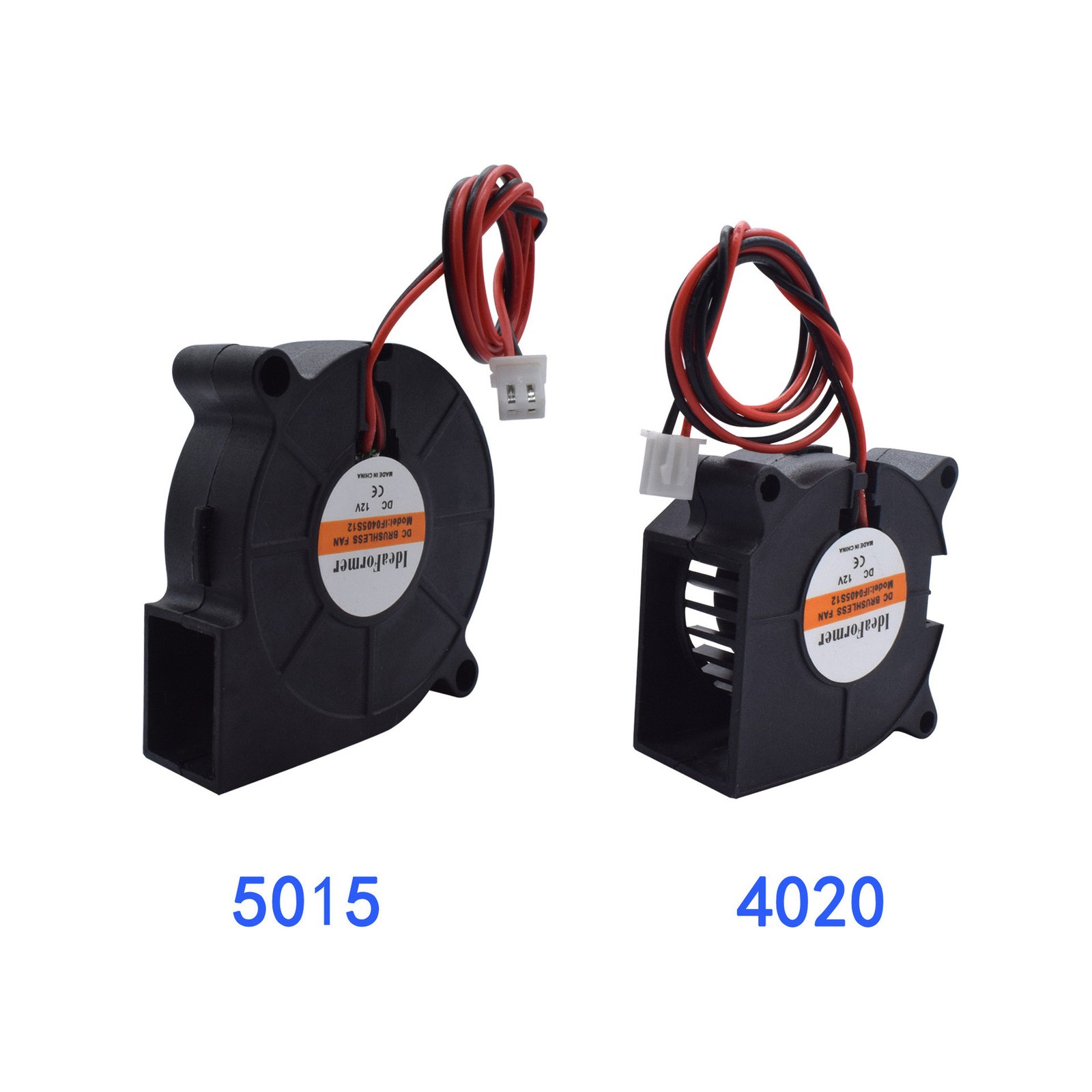
Why fan size, voltage, and connector checks matter
Cooling fans are easy to overlook until a hotend clogs, a print warps, or a control board overheats. 3D printers often use more than one fan: hotend heatsink fans, part-cooling fans, electronics fans, power-supply fans, and sometimes chamber or auxiliary fans. A replacement fan must match more than the outside dimensions. Voltage, connector, airflow direction, thickness, wire count, and mounting style all matter.
For adjacent compatibility checks, compare this guide with Hotend and Extruder Replacement Guide for 3D Printers and Creality, Bambu Lab, Anycubic, and Prusa Parts: What to Check Before Buying before choosing a final product.
Voltage and connector come first
A fan can fit physically and still be electrically wrong.
Shop cooling fans and hotend service parts
Cooling fan size is only the first check
Fan names often describe size, such as 4010, 4020, 5015, or 3010. The first two digits usually refer to width and height in millimeters, while the last two refer to thickness. A 4010 and 4020 fan may share the same face size but differ in thickness and airflow. If the printer shroud or duct has limited space, thickness can matter as much as width.
Also check whether the fan is axial or blower style. Axial fans move air straight through the fan body. Blower fans push air out through a side outlet and are common for part-cooling ducts. They are not direct substitutes unless the mount and duct are designed for them.
Cooling fan voltage and connector are critical
Many 3D printers use 24 V fans, while others use 12 V or 5 V fans. Replacing a fan with the wrong voltage can damage the fan, reduce cooling, create noise, or overload electronics. Check the label on the old fan, the printer documentation, or the board output before buying.
Connector style matters too. Two-pin, three-pin, and four-pin fans are not always wired the same way. A plug may look similar but have different polarity or spacing. If the listing does not show connector details, treat it as incomplete for model-specific replacement.
Match the cooling fan to the printer job
A hotend heatsink fan should run reliably because it prevents heat creep. A failing heatsink fan can lead to jams that look like filament or nozzle problems. A part-cooling fan affects overhangs, bridges, and small PLA details. An electronics fan protects drivers and control boards. Replacing the wrong fan may not fix the symptom.
Noise is another buying factor. Some quieter fans move less air or have different static pressure. If the fan pushes air through a duct, heatsink, or restricted path, airflow and pressure matter more than the noise rating alone.
Inspect airflow direction and mounting
Most fans have arrows showing airflow direction and blade rotation. If installed backwards, the fan may spin but cool the wrong area. Before removing the old fan, take a photo of its orientation, wiring path, and connector. That photo can prevent a simple replacement from becoming a troubleshooting session.
Ruyee Supply uses conservative compatibility language because 3D printer parts often look similar while using different dimensions, thread types, voltages, connectors, and firmware expectations. If a listing does not explicitly confirm your exact printer model, treat it as a candidate and compare the measurements before checkout.
Check airflow and mounting
Cooling fans affect print quality and hotend reliability.
How to use this cooling fan guide before checkout
Use this guide as a final filter before you add a product to the cart. Start with the printer or resin system you own, then compare the listing against the actual part you are replacing or the material you already use successfully. The best listing is not always the one with the lowest price; it is the one that makes the key dimensions, material, voltage, connector, size, or handling requirement easy to verify.
If you are buying a consumable, check the storage and use conditions as carefully as the product name. If you are buying a replacement part, compare the old part with the photos and specifications. For many 3D printer categories, one missing measurement can turn a good-looking product into the wrong product. When a product page does not answer an important fit question, choose a more specific listing or contact support before ordering.
For repeat purchases, save the confirmed specification after the first successful order. That makes future replacements faster and reduces the chance of mixing similar-looking parts from different printer families.
3D printer cooling fan buying checklist
- Confirm fan size and thickness, such as 4010, 4020, or 5015.
- Match voltage: 5 V, 12 V, or 24 V.
- Check connector type, polarity, wire count, and cable length.
- Match axial or blower style to the duct and mount.
- Confirm airflow direction before final installation.
Cooling fan buying mistakes to avoid
- Buying the right size but wrong voltage.
- Using an axial fan where a blower fan is required.
- Ignoring connector polarity.
- Choosing a quiet fan that cannot move enough air through the duct.
3D printer cooling fan frequently asked questions
Can I replace a 24 V fan with a 12 V fan?
No. Match voltage unless you are intentionally using a proper converter and understand the wiring.
What is a 4010 fan?
It usually means a 40 mm by 40 mm fan that is 10 mm thick.
Why does fan direction matter?
A fan installed backwards can spin normally while cooling the wrong area.
About this 3D printer cooling fan guide
Written by: Ruyee Supply Editorial Team. Last updated: September 2026.
Ruyee Supply writes buying guides for 3D printer owners who need practical replacement parts, consumables, and compatibility checks before ordering. We evaluate products by the details buyers can verify before checkout: printer model, part dimensions, material, voltage, connector type, package contents, and supplier listing clarity.
This guide uses conservative compatibility wording. A part may be a good candidate for your printer, but you should still compare the product listing with your printer manual, old part, slicer profile, or manufacturer documentation before purchase.
Sources and further reading
- Bambu Lab Wiki for printer, build plate, and maintenance documentation.
- Creality official blog and support resources for FDM printer parts, nozzles, and maintenance guidance.
- Formlabs Support for resin handling, resin printing, and safety references.
- UltiMaker Support for filament material guidance and FDM printing basics.