PTFE tube and coupler quick answer
Choose PTFE tube by filament diameter, tube inner diameter, outer diameter, length, and coupler compatibility. For 1.75 mm filament, check whether the listing is made for 1.75 mm feed paths and whether the included couplers match your printer.
Why PTFE tube and coupler fit matters
PTFE tubing looks simple, but the wrong tube or coupler can cause feeding problems, under-extrusion, heat creep, clogs, and inconsistent extrusion. Bowden printers rely on a clean filament path from the extruder to the hotend. Direct-drive printers may still use short PTFE sections in the hotend or filament guide. Buying the correct tube means checking inner diameter, outer diameter, length, temperature exposure, and coupler style.
For adjacent compatibility checks, compare this guide with Hotend and Extruder Replacement Guide for 3D Printers and 3D Printer Nozzle Buying Guide: Diameter, Thread, and Material before choosing a final product.
Check PTFE inner and outer diameter
The tube must guide filament without adding drag.
Shop PTFE tubes, couplers, and Bowden parts
PTFE tube inner diameter controls filament guidance
The tube’s inner diameter affects how much the filament can move inside the tube. A tighter tube can improve guidance for flexible or precise feeding, but it must still allow smooth movement. A tube that is too loose can increase retraction inconsistency. A tube that is too tight, dirty, kinked, or poorly cut can add drag and cause feed problems.
For 1.75 mm filament, many buyers look for tubing made for that filament size, but you still need to check the listed ID and OD. Outer diameter matters because couplers and fittings grip the outside of the tube. Common couplers will not hold the tube correctly if the OD is wrong.
PTFE tube couplers are not all the same
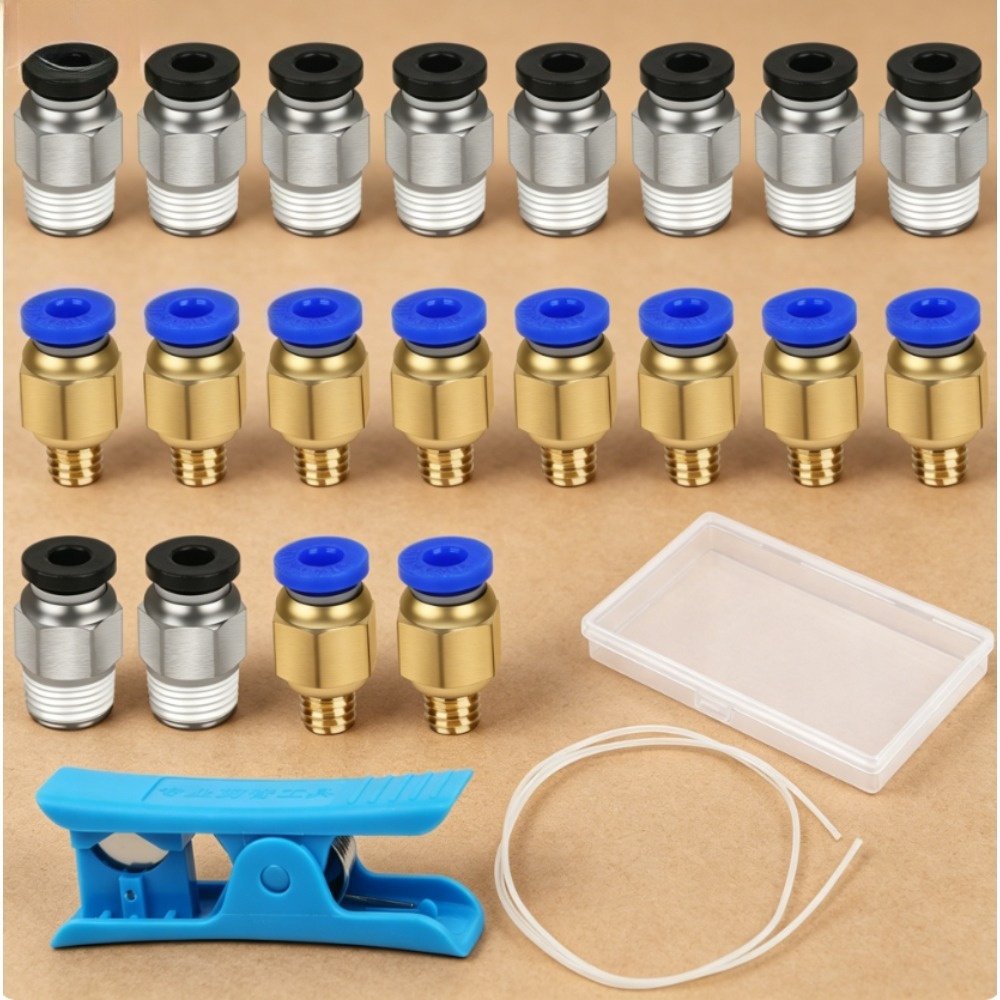
Pneumatic couplers such as PC4-M6 and PC4-M10 styles are common on many printers, but thread size and mounting location vary. A kit may include several couplers, but not every printer uses both. Compare the old fitting thread, the hotend side, the extruder side, and the available space around the mount.
Worn couplers can let the tube move during retraction. That movement causes stringing, inconsistent extrusion, and sometimes clogs. If your tube slips in and out during printing, replacing the coupler may matter as much as replacing the tube.
PTFE tube ends must be cut cleanly
A rough or angled tube end can create a gap near the nozzle or heatbreak. In hotend designs where PTFE touches the nozzle, that gap can collect melted filament and create clogs. Use a proper cutter and make the end square. If the printer design uses a PTFE liner inside the hotend, the length must be exact enough to seat properly.
Heat exposure matters. Ordinary PTFE has temperature limits, and some hotend designs should not push PTFE beyond safe operating ranges. All-metal hotends reduce PTFE exposure, while PTFE-lined hotends require more attention to tube condition and installation.
Replace tubing when symptoms point to the feed path
Common signs include filament dust near the extruder, tube movement at the coupler, rough extrusion, repeated heat creep clogs, stringing that tuning does not solve, or visible burned/deformed tube ends. PTFE is inexpensive compared with troubleshooting hours, but replacement should still match the original path.
Ruyee Supply uses conservative compatibility language because 3D printer parts often look similar while using different dimensions, thread types, voltages, connectors, and firmware expectations. If a listing does not explicitly confirm your exact printer model, treat it as a candidate and compare the measurements before checkout.
Coupler thread decides installation
A correct tube with the wrong fitting still fails.
How to use this PTFE tube guide before checkout
Use this guide as a final filter before you add a product to the cart. Start with the printer or resin system you own, then compare the listing against the actual part you are replacing or the material you already use successfully. The best listing is not always the one with the lowest price; it is the one that makes the key dimensions, material, voltage, connector, size, or handling requirement easy to verify.
If you are buying a consumable, check the storage and use conditions as carefully as the product name. If you are buying a replacement part, compare the old part with the photos and specifications. For many 3D printer categories, one missing measurement can turn a good-looking product into the wrong product. When a product page does not answer an important fit question, choose a more specific listing or contact support before ordering.
For repeat purchases, save the confirmed specification after the first successful order. That makes future replacements faster and reduces the chance of mixing similar-looking parts from different printer families.
PTFE tube and coupler buying checklist
- Confirm filament size, tube ID, tube OD, and tube length.
- Match coupler thread style and tube diameter.
- Check whether your printer uses Bowden, direct drive, or a short hotend liner.
- Cut tube ends square and clean.
- Inspect couplers if the tube moves during retraction.
PTFE tube buying mistakes to avoid
- Buying tubing without checking OD and coupler fit.
- Cutting the tube with scissors and leaving an angled end.
- Ignoring worn couplers that let the tube slip.
- Using PTFE in a hotend setup where temperature limits are exceeded.
PTFE tube and coupler frequently asked questions
Can I use any PTFE tube for 1.75 mm filament?
No. Check inner diameter, outer diameter, temperature rating, and coupler compatibility.
Do direct-drive printers need PTFE tube?
Some use short PTFE guides or hotend liners, but the length and installation differ from Bowden systems.
Why does the coupler matter?
A worn or wrong coupler can let the tube move, causing retraction inconsistency and clogs.
About this PTFE tube and coupler guide
Written by: Ruyee Supply Editorial Team. Last updated: September 2026.
Ruyee Supply writes buying guides for 3D printer owners who need practical replacement parts, consumables, and compatibility checks before ordering. We evaluate products by the details buyers can verify before checkout: printer model, part dimensions, material, voltage, connector type, package contents, and supplier listing clarity.
This guide uses conservative compatibility wording. A part may be a good candidate for your printer, but you should still compare the product listing with your printer manual, old part, slicer profile, or manufacturer documentation before purchase.
Sources and further reading
- Bambu Lab Wiki for printer, build plate, and maintenance documentation.
- Creality official blog and support resources for FDM printer parts, nozzles, and maintenance guidance.
- Formlabs Support for resin handling, resin printing, and safety references.
- UltiMaker Support for filament material guidance and FDM printing basics.