3D printer resin quick answer
Choose resin by printer type, wavelength, resin purpose, bottle size, handling requirements, and post-curing workflow. For most consumer LCD resin printers, confirm whether the resin is made for 405 nm machines before checkout.
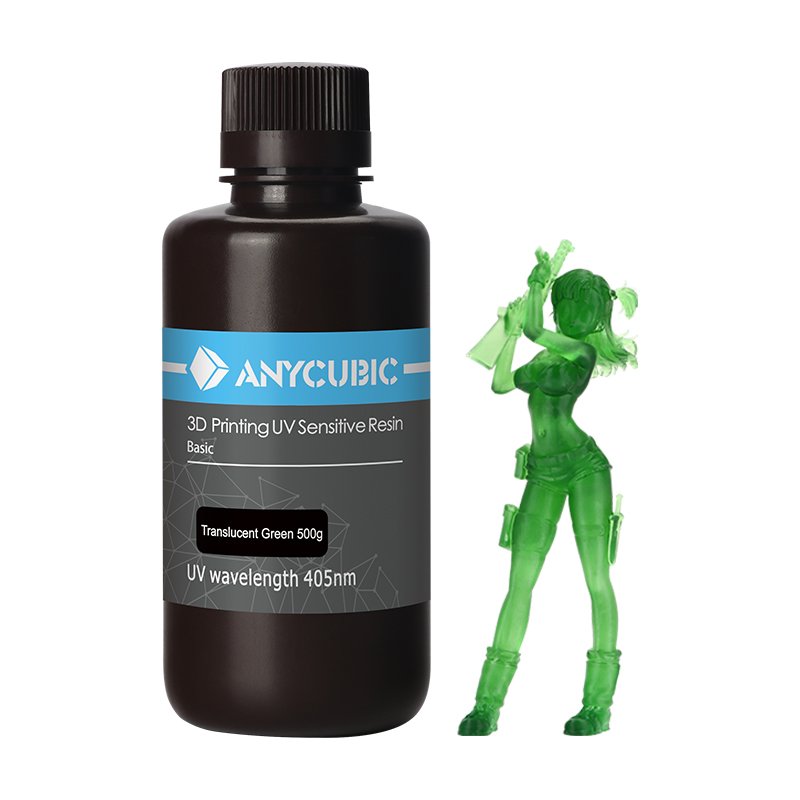
Why LCD and SLA resin choice matters
Resin buying looks simple until a bottle arrives and does not match the printer, the project, or the user’s safety setup. Most consumer resin printers use photopolymer resin cured by UV light, and many common desktop LCD machines use 405 nm resin. That does not mean every resin is the same. Resin type, wavelength, bottle size, color, odor, toughness, flexibility, and post-processing requirements all affect the buying decision.
For adjacent compatibility checks, compare this guide with FEP Film Buying Guide for Resin 3D Printers and Creality, Bambu Lab, Anycubic, and Prusa Parts: What to Check Before Buying before choosing a final product.
Match resin to the printer workflow
Bottle labels should confirm the basics before you order.
Shop resin and resin printer consumables
Start with resin printer and wavelength compatibility
The first check is whether the resin is intended for your printer’s curing system. Many LCD and MSLA printers use 405 nm resin, but you should confirm the specification in your printer manual or manufacturer documentation. A resin may be excellent for one process and unsuitable for another. If the listing does not state the wavelength or compatible printer type, treat it as a candidate, not a confirmed match.
Also check bottle size. A one-kilogram bottle may be a good value for frequent printing, but smaller bottles can make sense when testing a new color or formula. Resin has storage expectations and a shelf life, so buying more than you can use can become wasteful.
Choose resin type by use case
Standard resin is common for miniatures, visual models, and general detail printing. Tough resin is better when a part needs more impact resistance. Flexible resin can bend but is not a direct replacement for rubber in every use. Water-washable resin sounds convenient, but it still needs careful handling and does not remove the need for safety practices. Castable, dental, engineering, or specialty resins should only be bought when the resin’s intended application matches the project.
Color affects both appearance and print behavior. Gray resin is popular for miniatures and prototypes because it shows surface detail clearly. Clear and translucent resins can need different exposure tuning. Dark or heavily pigmented resins may require different exposure settings compared with light colors.
Resin safety and workflow are part of the product
Resin printing is not just a bottle and a printer. You need gloves, eye protection, ventilation, a clean workspace, washing method, post-curing setup, and a plan for contaminated paper towels, supports, and failed prints. Uncured resin should not be handled like ordinary craft material. Read the resin maker’s safety information and follow local disposal rules.
Before buying resin, make sure the product listing is clear about handling, storage, and post-processing. If you are new to resin printing, avoid buying several specialty resins at once. Start with one reliable standard resin, learn exposure and cleaning, then expand into tough, flexible, or specialty formulas.
Resin also affects consumables
Your resin choice can affect FEP film wear, vat cleaning, supports, failure rate, and post-processing time. A high-detail miniature resin may not be the best resin for large functional parts. A tough resin may need different support settings. A poorly matched resin can lead to failed prints that damage release film or create more cleanup work.
Ruyee Supply uses conservative compatibility language because 3D printer parts often look similar while using different dimensions, thread types, voltages, connectors, and firmware expectations. If a listing does not explicitly confirm your exact printer model, treat it as a candidate and compare the measurements before checkout.
Resin needs handling discipline
A good resin choice includes storage, cleanup, and disposal planning.
How to use this resin guide before checkout
Use this guide as a final filter before you add a product to the cart. Start with the printer or resin system you own, then compare the listing against the actual part you are replacing or the material you already use successfully. The best listing is not always the one with the lowest price; it is the one that makes the key dimensions, material, voltage, connector, size, or handling requirement easy to verify.
If you are buying a consumable, check the storage and use conditions as carefully as the product name. If you are buying a replacement part, compare the old part with the photos and specifications. For many 3D printer categories, one missing measurement can turn a good-looking product into the wrong product. When a product page does not answer an important fit question, choose a more specific listing or contact support before ordering.
For repeat purchases, save the confirmed specification after the first successful order. That makes future replacements faster and reduces the chance of mixing similar-looking parts from different printer families.
Resin buying checklist for LCD and SLA printers
- Confirm printer process and resin wavelength, especially 405 nm for common LCD printers.
- Choose standard, tough, flexible, washable, or specialty resin based on the actual print use.
- Check bottle size, color, storage needs, and shelf life.
- Confirm you have gloves, ventilation, washing, curing, and disposal workflow.
- Check whether your FEP film and vat condition are ready before starting a new resin.
Resin buying mistakes to avoid
- Buying resin without confirming wavelength or printer type.
- Treating water-washable resin as harmless.
- Skipping post-curing equipment.
- Using old or damaged FEP film and blaming the resin for failures.
3D printer resin frequently asked questions
Do most resin printers use 405 nm resin?
Many common desktop LCD/MSLA printers use 405 nm resin, but you should confirm your printer specification before buying.
Is water-washable resin safer?
It can simplify cleaning, but uncured resin still needs gloves, ventilation, careful handling, and proper disposal.
What resin should a beginner buy first?
A standard gray or neutral-color resin from a clear listing is usually easier than starting with flexible, castable, or specialty resin.
About this resin buying guide
Written by: Ruyee Supply Editorial Team. Last updated: September 2026.
Ruyee Supply writes buying guides for 3D printer owners who need practical replacement parts, consumables, and compatibility checks before ordering. We evaluate products by the details buyers can verify before checkout: printer model, part dimensions, material, voltage, connector type, package contents, and supplier listing clarity.
This guide uses conservative compatibility wording. A part may be a good candidate for your printer, but you should still compare the product listing with your printer manual, old part, slicer profile, or manufacturer documentation before purchase.
Sources and further reading
- Bambu Lab Wiki for printer, build plate, and maintenance documentation.
- Creality official blog and support resources for FDM printer parts, nozzles, and maintenance guidance.
- Formlabs Support for resin handling, resin printing, and safety references.
- UltiMaker Support for filament material guidance and FDM printing basics.